Base64 Encoding & Decoding: Complete Guide for Developers
Base64 is one of the most fundamental encoding schemes in modern software development, yet many developers use it without fully understanding how it works or when to apply it. Whether you're handling API authentication, embedding images in HTML emails, or working with JWT tokens, Base64 encoding likely plays a role in your daily development work. This comprehensive guide will walk you through everything you need to know about Base64 encoding and decoding.
What is Base64 and Why Does It Exist?
Base64 is a binary-to-text encoding scheme that uses a set of 64 printable ASCII characters to represent binary data. The name "Base64" refers to this character set of 64 characters: A-Z (26), a-z (26), 0-9 (10), plus (+), and slash (/).
But why do we need Base64 encoding in the first place?
The fundamental problem it solves is simple yet critical: not all systems can safely transmit or process raw binary data. Early internet protocols, email systems, and many legacy applications were designed to work exclusively with text. When you needed to transmit images, executable files, or other binary content through these text-only channels, the data would often become corrupted or lost.
Base64 provides an elegant solution by converting any binary data into a text format that every system can safely handle. This made it possible to send file attachments through email, embed images directly in HTML, and safely transmit arbitrary data across networks that don't support binary transmission.
Even though many modern systems can now handle binary data directly, Base64 remains indispensable because it provides a standardized, universally compatible way to represent binary information as text. It's a proven standard that has stood the test of time since its formalization in RFC 2045 in 1996.
How Base64 Encoding Works: The Algorithm Explained
Understanding the Base64 algorithm is essential for developers who want to grasp how encoding and decoding actually function.
The Encoding Process
Base64 works by grouping binary data into chunks and converting each chunk into a base64 character. Here's the step-by-step process:
-
Take input data: Start with any binary sequence. For example, let's use the text "Hello" which in ASCII is: 01001000 01100101 01101100 01101100 01101111
-
Group into 6-bit chunks: Binary data is grouped into chunks of 6 bits (not 8 bits) because 2^6 = 64, which perfectly maps to our 64-character alphabet.
- 010010 001100 101011 011000 110110 111100
-
Convert to decimal: Each 6-bit group becomes a decimal number between 0 and 63.
- 010010 = 18, 001100 = 12, 101011 = 43, 011000 = 24, 110110 = 54, 111100 = 60
-
Map to Base64 alphabet: Each decimal number maps to a character in the Base64 character set:
- A=0, B=1, C=2... Z=25, a=26, b=27... z=51, 0=52, 1=53... 9=61, +=62, /=63
- 18=S, 12=M, 43=r, 24=Y, 54=2, 60=8
- Result: "SGVsbG8="
-
Add padding: If the input data length isn't evenly divisible by 3, padding characters (=) are added to ensure the output is always a multiple of 4 characters. This maintains consistency and helps decoders recognize when the original message ends.
The Decoding Process
Decoding reverses this process: convert Base64 characters back to 6-bit binary chunks, regroup them into 8-bit octets, then interpret the bytes as the original data. The process is deterministic and lossless—you always get back exactly what you put in.
Common Use Cases for Base64 Encoding
1. Data URIs for Inline Images
One of the most practical uses of Base64 is creating data URIs that embed images directly into HTML or CSS:
<img src="data:image/png;base64,iVBORw0KGgoAAAANSUhEUgAAAAUA...">
This eliminates an extra HTTP request for the image, improving page load times for small images. It's particularly useful for favicons, small icons, and other frequently-used assets.
2. Email Attachments
Email protocols (specifically SMTP) were designed to transmit text only. When you send an email attachment, it's automatically encoded to Base64 by your email client, allowing binary files to be safely transmitted through email systems. The receiving client then decodes it back to the original binary format.
3. API Authentication Tokens
Many APIs use Base64 encoding for basic authentication credentials. When you have a username and password, they're combined into "username:password", then Base64 encoded to create the authorization header:
Authorization: Basic SGVsbG86V29ybGQ=
4. JWT (JSON Web Tokens)
JSON Web Tokens consist of three Base64-encoded components separated by dots:
- Header (Base64-encoded JSON)
- Payload (Base64-encoded claims)
- Signature (cryptographic signature)
Example: eyJhbGciOiJIUzI1NiIsInR5cCI6IkpXVCJ9.eyJzdWIiOiIxMjM0NTY3ODkwIiwibmFtZSI6IkpvaG4gRG9lIn0.dozjgNryP4J3jVmNHl0w5N_XgL0n3I9PlFUP0THsR8U
5. Configuration Files and Data Serialization
When you need to include binary data in configuration files, databases, or APIs that expect text-based data, Base64 provides a reliable way to represent that binary information.
6. API Response Encoding
Sometimes APIs encode response data in Base64 to ensure compatibility across different systems and to reduce transmission errors.
Base64 vs. Other Encoding Methods
It's helpful to understand how Base64 compares to alternative encoding approaches:
Base64 vs. Hexadecimal (Hex)
- Hex uses 16 characters (0-9, A-F) and produces 2 hex digits per byte
- Base64 uses 64 characters and produces roughly 4 Base64 characters per 3 bytes
- Base64 is more space-efficient (33% overhead vs. 100% for hex)
- Hex is more human-readable and commonly used for debugging
Base64 vs. URL Encoding (Percent Encoding)
- URL encoding is designed specifically for embedding data in URLs
- Base64 is more compact for binary data but uses characters like + and / that have special meaning in URLs
- For URL-safe Base64, the + and / characters are replaced with - and _
Base64 vs. Compression + Encoding
- Base64 alone doesn't compress data; it increases size by ~33%
- Some systems combine compression (gzip) with Base64 encoding for efficiency
- Compression happens first, then the compressed data is Base64 encoded
Base64 vs. Encryption
- This is crucial: Base64 is NOT encryption. It's obfuscation.
- Anyone can decode Base64—it provides zero security
- Base64 is encoding (reversible transformation), not encryption (secure with key)
- Always encrypt sensitive data before Base64 encoding, never rely on Base64 for security
Performance Considerations and Size Overhead
One of the most important practical considerations when using Base64 is understanding its size overhead.
The 33% Size Increase
Base64 encoding inevitably increases data size by approximately 33%. Here's why:
- Original data: 3 bytes = 24 bits
- Base64 output: 4 characters = 4 × 6 bits = 24 bits
- While the bits are the same, Base64 characters are transmitted as full 8-bit bytes
- This creates overhead: 3 input bytes become 4 bytes of output
For a 1 MB file, you can expect the Base64 encoded version to be roughly 1.33 MB. This is a fixed cost you should factor into bandwidth calculations, especially when dealing with large files or high-traffic APIs.
When Size Overhead Matters
- Data URIs: Only practical for small images (< 50KB) due to overhead
- API payloads: Large Base64-encoded files increase bandwidth consumption
- Database storage: Storing Base64-encoded files uses 33% more disk space
- JWT tokens: Adds overhead to every API request carrying authentication
Optimization Strategies
- Use binary protocols (Protocol Buffers, MessagePack) for large data transfers
- Compress data before Base64 encoding to reduce overall size
- Consider streaming binary data directly when possible
- Use URL-safe Base64 variants when transmitting via URLs
Critical Security Misconceptions
The most dangerous misunderstanding about Base64 is treating it as a security mechanism. This must be addressed directly:
Base64 is NOT Encryption
Base64 is encoding, not encryption. It's completely reversible and provides zero cryptographic security:
"Hello World" → Base64: "SGVsbG8gV29ybGQ="
"SGVsbG8gV29ybGQ=" → Decoded: "Hello World"
Anyone with a Base64 decoder (available online, in every programming language) can instantly decode your message. There are no keys, no algorithms, no security—just a simple text transformation.
The Misconception in Practice
A common mistake is developers thinking Base64 hides sensitive information. Examples of this dangerous pattern:
{
  "apiKey": "c2VjcmV0LWFwaS1rZXktMTIzNA=="
}
This provides false confidence. An attacker intercepting this communication can immediately decode the Base64 to reveal the API key.
The Correct Approach
If you have sensitive data:
- Encrypt first: Use proper encryption (AES-256, etc.) with appropriate key management
- Then encode if needed: If the encrypted output needs to be transmitted as text, apply Base64
- Add authentication: Use HMAC or digital signatures to verify data integrity
- Use HTTPS/TLS: Always transmit sensitive data over secure, encrypted channels
Base64 is a valid encoding step, but it's never the security mechanism itself.
Best Practices for Base64 Encoding and Decoding
1. Understand Your Use Case
Before applying Base64, clearly understand whether you're solving a technical problem (binary in text channel) or a security problem (protecting sensitive data). Base64 solves the first, never the second.
2. Consider Size Overhead
Account for the ~33% size increase when making architectural decisions. For large files, explore alternatives like binary protocols or direct binary transmission.
3. Use Proper Error Handling
Base64 decoders can fail with invalid input. Always implement proper error handling:
try {
  const decoded = atob(encodedString);
} catch (error) {
  console.error('Invalid Base64 input');
}
4. Validate Input Formats
Not all Base64 strings are valid. Validate that input matches Base64 format requirements:
- Length is a multiple of 4 (when padding is included)
- Contains only valid characters (A-Z, a-z, 0-9, +, /, =)
5. Use URL-Safe Base64 When Appropriate
When including Base64 in URLs, use URL-safe Base64 (RFC 4648 Section 5) which replaces:
+with-/with_- Omits padding
=characters
6. Implement Proper Encryption for Sensitive Data
If encoding sensitive data, always apply proper encryption (with keys, algorithms, and proper management) before or after Base64 encoding.
7. Document Your Encoding Decisions
When using Base64 in APIs or file formats, clearly document:
- That Base64 is being used and why
- The character set (standard vs. URL-safe)
- Whether padding is expected
- What the original data format is
Simplify Base64 Operations with UtiliZest
Managing Base64 encoding and decoding in development can be tedious. Whether you're debugging JWT tokens, creating data URIs, or converting API responses, doing this manually is error-prone and time-consuming.
UtiliZest's Base64 codec tool eliminates this friction. Our browser-based utility provides:
- Instant encoding and decoding with real-time preview
- Visual feedback showing original and encoded sizes
- JWT token inspection with automatic parsing
- Batch processing for multiple strings or files
- URL-safe Base64 support for web-safe encoding
- Copy-to-clipboard functionality for seamless workflow integration
- No installation required - works entirely in your browser
- Privacy-first approach - all processing happens locally, nothing sent to servers
Visit UtiliZest's Base64 codec to start encoding and decoding instantly. No signup required, completely free, and optimized for developer productivity.
How Base64 Encoding Actually Works
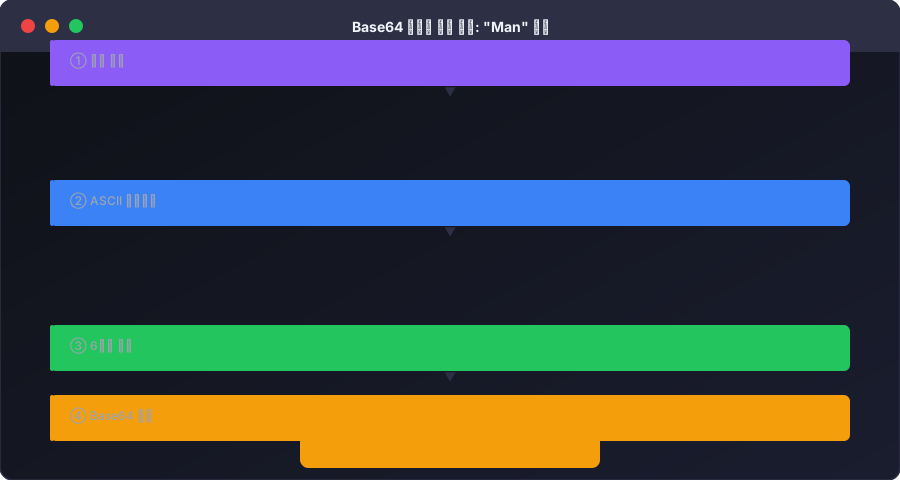
Let's walk through the Base64 algorithm step by step using the string Man.
Step 1: Convert to ASCII binary
- M → 77 (binary: 01001101)
- a → 97 (binary: 01100001)
- n → 110 (binary: 01101110)
Step 2: Concatenate all bits (24 bits total)
010011010110000101101110
Step 3: Split into 6-bit groups
010011 010110 000101 101110
Step 4: Map to Base64 alphabet
- 010011 = 19 →
T - 010110 = 22 →
W - 000101 = 5 →
F - 101110 = 46 →
u
Result: Man → TWFu
When input length isn't a multiple of 3, = padding characters are appended — which is why Base64 output frequently ends with = or ==.
Base64 Code Examples by Language
// JavaScript (Browser/Node.js)
const encoded = btoa('Hello, World!');        // "SGVsbG8sIFdvcmxkIQ=="
const decoded = atob('SGVsbG8sIFdvcmxkIQ=='); // "Hello, World!"

// Binary/file data — use Buffer in Node.js
const buf = Buffer.from('Hello');
const b64 = buf.toString('base64'); // "SGVsbG8="
# Python 3
import base64
encoded = base64.b64encode(b'Hello, World!').decode('utf-8')  # SGVsbG8sIFdvcmxkIQ==
decoded = base64.b64decode('SGVsbG8sIFdvcmxkIQ==').decode('utf-8')  # Hello, World!
# Linux/macOS terminal
echo -n "Hello" | base64          # SGVsbG8=
echo "SGVsbG8=" | base64 --decode # Hello
Why Base64 Is NOT Encryption
Many developers mistakenly use Base64 for security purposes. Base64 is encoding, not encryption. Anyone can instantly recover the original data using any Base64 decoder. Even JWT payloads are Base64-encoded — their contents are fully readable by anyone (only the signature is verifiable).
Never use Base64 for: passwords, API keys, or personal information. These require AES-256 encryption or hashing algorithms like bcrypt or Argon2.