Why Password Security Matters More Than Ever
In 2026, cybersecurity threats continue to escalate at an alarming rate. According to the Verizon Data Breach Investigations Report, over 80% of hacking-related breaches involve compromised or weak passwords. The average cost of a data breach has now exceeded $4.5 million (approximately 6 billion KRW), making password security not just a personal concern but a significant business risk.
Despite growing awareness, millions of people still use passwords like "123456", "password", and "qwerty" — all of which can be cracked in less than one second by modern hardware. Password generators exist to eliminate this human tendency toward weak, predictable passwords by creating truly random strings that resist all known attack methods.
The Science of Password Strength
Password strength is measured by entropy, a concept from information theory that quantifies unpredictability. Entropy is calculated in bits: a password with N possible characters and L characters in length has an entropy of L × log₂(N) bits. The higher the entropy, the longer it takes to crack.
For example, a password using only lowercase letters (26 characters) with a length of 8 has approximately 37.6 bits of entropy. A modern GPU can test billions of combinations per second, cracking such a password in minutes. However, a 16-character password using uppercase, lowercase, numbers, and symbols (95 characters) has approximately 105 bits of entropy — making it practically uncrackable even with the most powerful supercomputers.
The key factors that determine password strength are length, character diversity, and randomness. Of these three, length is by far the most important. Each additional character exponentially increases the number of possible combinations, making the password dramatically harder to crack.
How Brute-Force Attacks Work
A brute-force attack systematically tries every possible combination of characters until the correct password is found. Modern attackers use specialized hardware — often arrays of high-end GPUs — that can test hundreds of billions of passwords per second.
Dictionary attacks are a more efficient variant. Instead of trying every combination, attackers use lists of common passwords, dictionary words, and previously leaked credentials. These lists contain billions of real passwords from past data breaches, making them surprisingly effective. If your password is a common word or phrase, even with minor modifications like "P@ssw0rd!", it is likely already in these dictionaries.
Rainbow table attacks use precomputed hash tables to reverse common password hashes. While salting and modern hashing algorithms (like bcrypt, scrypt, and Argon2) mitigate this, using a truly random password provides an additional layer of defense.
Credential stuffing attacks use leaked username-password pairs from one service to attempt login on other services. This is why using unique passwords for every account is essential — if one service is breached, the others remain safe.
What Makes a Password Truly Strong?
Based on current security research and NIST (National Institute of Standards and Technology) guidelines, a strong password in 2026 should meet these criteria:
Length: At least 12 characters, preferably 16 or more. NIST now emphasizes length over complexity, as longer passwords are exponentially harder to crack regardless of character composition.
Character diversity: Include uppercase letters (A-Z), lowercase letters (a-z), numbers (0-9), and special symbols (!@#$%^&*). Each character set significantly increases the search space an attacker must cover.
True randomness: Generated by a cryptographically secure random number generator, not chosen by a human. People are notoriously bad at creating random patterns — we tend to use dictionary words, dates, names, and predictable substitutions (e.g., "a" → "@", "s" → "$").
Uniqueness: Every account should have a different password. With a password manager, there is no reason to reuse passwords across services.
How Our Password Generator Works
UtiliZest's Password Generator uses the Web Crypto API (window.crypto.getRandomValues), which is a cryptographically secure pseudo-random number generator (CSPRNG) built into modern browsers. This is the same level of randomness used by security-critical applications like TLS encryption and digital signatures.
The generator allows you to customize every aspect of your password. You can set the length from 8 to 128 characters, toggle uppercase letters, lowercase letters, numbers, and symbols independently, exclude specific characters that might cause issues with certain systems (for example, some legacy systems do not accept special characters), and generate multiple passwords at once to compare.
The built-in strength indicator provides real-time feedback by analyzing your password's entropy, length, character diversity, and common patterns. It displays a visual bar with color coding (red for weak, yellow for fair, green for strong, and emerald for very strong) along with an estimated time to crack.
Password Management Best Practices
Use a password manager. With unique, random 16+ character passwords for each account, memorization is impossible — and that is the point. Password managers like Bitwarden, 1Password, and KeePassXC encrypt your vault with a single master password, which should be the only password you actually memorize.
Enable two-factor authentication (2FA) wherever possible. Even if an attacker obtains your password, 2FA requires a second verification step (usually a time-based code from an authenticator app) that makes unauthorized access significantly harder.
Never share passwords via email, chat, or text messages. These channels are not encrypted end-to-end and may be logged or intercepted. If you must share a credential, use a secure password sharing feature built into your password manager.
Regularly audit your passwords using breach-checking services like "Have I Been Pwned". If any of your accounts appear in a data breach, change those passwords immediately.
Avoid security questions that can be researched or guessed. Mother's maiden name, first pet, and childhood city are all discoverable through social media. If security questions are required, treat them as additional passwords and store random answers in your password manager.
The Future of Authentication
While passwords remain the dominant authentication method, the industry is moving toward passwordless authentication through technologies like passkeys (FIDO2/WebAuthn), biometric verification, and hardware security keys. Major platforms including Apple, Google, and Microsoft now support passkeys, which use public-key cryptography to eliminate the risks associated with traditional passwords entirely.
However, the transition will take years, and passwords will remain necessary for many services during this period. Using a password generator and password manager is the best bridge between the current password-based reality and the passwordless future.
Generate Your Secure Password Now
UtiliZest's Password Generator creates cryptographically strong passwords instantly in your browser. No data is sent to any server — everything runs locally on your device. Customize length, character types, and exclusion rules, then copy your new password with one click. Start protecting your accounts today.
The Real Scale of Password-Based Attacks
Security industry data paints a stark picture of password security realities.
- Verizon DBIR Report: 81% of data breaches involve weak or stolen credentials.
- Have I Been Pwned Database: As of 2026, over 12 billion compromised accounts are indexed.
- NordPass Survey: The most-used password globally remains
123456, used by hundreds of millions of people.
Password Strength vs. Crack Time
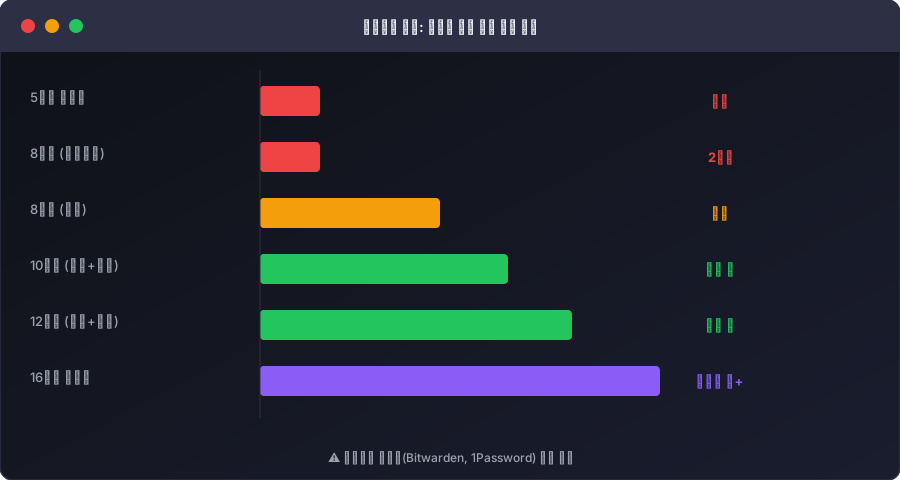
The time required to brute-force a password varies astronomically based on length and character diversity.
| Password Example | Character Types | Length | Estimated Crack Time |
|---|---|---|---|
hello | lowercase | 5 | Instant (<0.001s) |
Hello1! | mixed+digit+special | 7 | Minutes |
H3ll0W0rld! | mixed+digit+special | 11 | Hundreds of years |
| 16-char random | mixed+digit+special | 16 | Billions of years+ |
Password Types: Pros and Cons
Passphrases (e.g., correct-horse-battery-staple)
- Pro: Easy to remember; length provides strength
- Con: Potentially vulnerable to dictionary attacks
Randomly Generated (e.g., xK9#mP2$qR7@)
- Pro: No pattern — strongest against all attack types
- Con: Hard to memorize → requires a password manager
Pattern-based (e.g., Korea2024!)
- Pro: Easy to remember
- Con: Highly vulnerable to personal-info attacks (birthday, name, location)
Bottom line: Use randomly generated passwords for all accounts you don't need to memorize (nearly all online services), and store them in a password manager (1Password, Bitwarden, etc.). This is the current best practice recommended by security professionals.