What Is a QR Code and How Does It Work?
A QR (Quick Response) code is a two-dimensional barcode that stores information in a matrix of black and white squares. Invented in 1994 by Denso Wave, a subsidiary of Toyota, QR codes were originally designed to track automotive parts during manufacturing. Today, they have become one of the most ubiquitous digital technologies, used in everything from restaurant menus and payment systems to boarding passes and marketing campaigns.
Unlike traditional one-dimensional barcodes that can only store up to 20 digits, a QR code can encode up to 7,089 numeric characters, 4,296 alphanumeric characters, or 2,953 bytes of binary data. This massive capacity, combined with the ability to be scanned instantly by any smartphone camera, has made QR codes the preferred bridge between physical and digital worlds.
A QR code consists of several key components: the finder patterns (three large squares in the corners) help scanners detect and orient the code; alignment patterns maintain readability when the code is curved or distorted; timing patterns define the grid structure; the format information area stores error correction level and mask pattern data; and the data area contains the actual encoded information.
Understanding Error Correction Levels
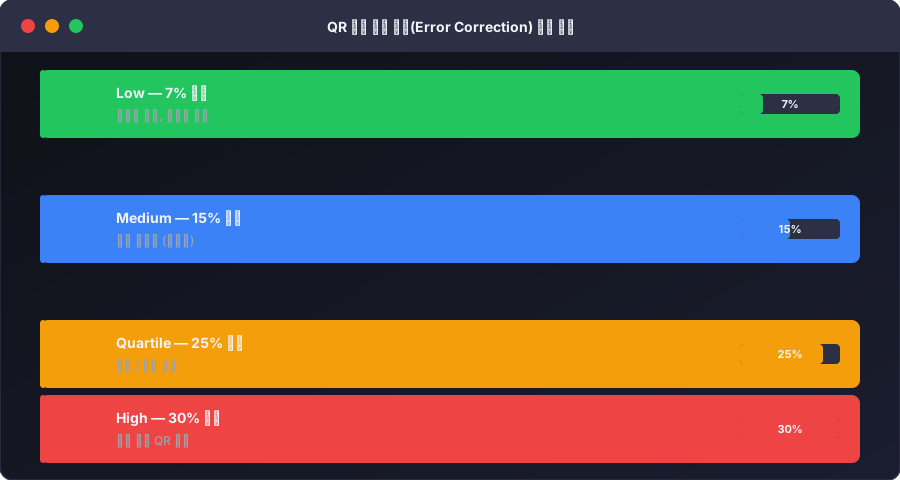
One of the most important features of QR codes is their built-in error correction capability, based on Reed-Solomon error correction codes. This technology allows QR codes to remain scannable even when partially damaged, obscured, or dirty. There are four error correction levels:
Level L (Low) can recover approximately 7% of data. This level produces the smallest QR codes and is suitable when the code will be displayed in clean, controlled environments like digital screens.
Level M (Medium) can recover approximately 15% of data. This is the most commonly used level, offering a good balance between code size and reliability for printed materials.
Level Q (Quartile) can recover approximately 25% of data. This level is recommended when the QR code may be partially covered or when adding a small logo overlay.
Level H (High) can recover approximately 30% of data. This maximum redundancy level is ideal for harsh environments, creative designs with large logo overlays, or any situation where the code may be significantly obscured.
Choosing the right error correction level involves a trade-off: higher levels produce denser (larger) QR codes because more redundancy data needs to be stored. For a URL that is only 50 characters, even Level H produces a reasonably small code, but for longer data strings, you may need to balance between correction level and physical size.
How to Create Effective QR Codes
Creating a QR code is simple, but creating an effective QR code requires thought and planning. Here are the key considerations:
Content optimization is the first step. For URLs, always use the shortest possible link. URL shorteners like bit.ly reduce the data that needs to be encoded, resulting in a simpler, easier-to-scan QR code. Remove unnecessary tracking parameters and use HTTPS for security.
Size matters significantly. The general rule is that the QR code should be at least 2 cm × 2 cm (about 0.8 × 0.8 inches) for close-range scanning (within 25 cm), and the scanning distance in centimeters should be roughly 10 times the code's width. For a billboard viewed from 10 meters away, the QR code should be at least 1 meter wide.
Contrast is essential for reliable scanning. The foreground (data modules) should be significantly darker than the background. While traditional black-on-white provides the best scan reliability, colored QR codes work well as long as there is sufficient contrast. Avoid light-colored foregrounds on light backgrounds.
Always include a quiet zone — a clear border around the QR code at least 4 modules wide. This margin helps scanners distinguish the QR code from surrounding content.
Customizing QR Codes for Brand Identity
Modern QR code generators allow extensive customization without sacrificing functionality. Here are the most common customization options:
Color customization lets you match the QR code to your brand colors. The key rule is maintaining high contrast between foreground and background. You can use any dark color for the foreground modules and any light color for the background. Some brands even use gradient effects, though this can reduce scan reliability if not done carefully.
Logo integration is popular for branded QR codes. The error correction system allows you to overlay a small logo (typically up to 10-30% of the code area, depending on the error correction level) in the center of the QR code. Use Level Q or H error correction when adding logos to ensure the code remains scannable.
Shape modifications include rounding the data modules (dots instead of squares), using custom module shapes, or adding decorative frames. These modifications generally work well as long as the finder patterns remain clearly visible and the modules maintain sufficient contrast.
Real-World Applications of QR Codes
Marketing and advertising: QR codes on print ads, product packaging, business cards, and billboards direct users to landing pages, special offers, or promotional videos. They provide a measurable link between offline marketing and online engagement, allowing marketers to track scan counts, locations, and times.
Payments and transactions: In many countries, especially in Asia, QR code-based payments have become the primary transaction method. Services like Alipay, WeChat Pay, KakaoPay, and various bank apps use QR codes for instant peer-to-peer and merchant payments.
Restaurant and hospitality: Digital menus accessed via QR codes became standard during the COVID-19 pandemic and have persisted because they reduce printing costs, allow real-time updates, and provide a contactless experience.
Authentication and security: Two-factor authentication apps use QR codes to securely share the initial secret key during setup. Wi-Fi network sharing via QR codes eliminates the need to manually enter complex passwords.
Education: Teachers use QR codes to link to supplementary materials, interactive exercises, and multimedia content. Students can scan a code in a textbook to watch a related video or access practice problems.
Event management: QR codes on tickets and badges enable fast check-in, reduce fraud, and provide organizers with real-time attendance data.
QR Code vs. Other Barcode Formats
While QR codes are the most popular 2D barcode, other formats exist for specific use cases. Data Matrix codes are smaller and more suitable for marking tiny electronic components. PDF417 is used on driver's licenses and boarding passes because it can encode more text data. Aztec codes, used by some transit systems, do not require a quiet zone.
QR codes remain the best general-purpose choice because of their universal scanner support (every smartphone camera), massive data capacity, robust error correction, and widespread public familiarity.
Generate Your Custom QR Code Now
UtiliZest's QR Code Generator creates high-quality QR codes instantly in your browser. Customize the size, error correction level, foreground and background colors, and download your code as SVG (for scalable vector graphics) or PNG (for raster images). No watermarks, no limits, no data collection — just fast, free QR code generation.
Whether you need a QR code for your business card, restaurant menu, marketing campaign, or Wi-Fi network, our tool produces scannable, professional-looking codes in seconds.
QR Code Error Correction Level Guide
QR codes have built-in error correction that allows them to be read even when partially damaged. Higher levels offer more resilience but produce more complex codes.
| Level | Damage Recovery | Best Use Case |
|---|---|---|
| L (Low) | 7% | Clean indoor environments, digital screens |
| M (Medium) | 15% | Standard printed materials (default) |
| Q (Quartile) | 25% | Industrial use, outdoor environments |
| H (High) | 30% | Logo-embedded QR codes, high-damage-risk settings |
H Level required for logo embedding: When you place a logo in the center of a QR code, it covers part of the data. Always generate at H level. The logo should cover no more than 30% of the total area for reliable scanning.
QR Code Data Capacity Limits
QR codes have a maximum data capacity. Higher capacity makes the code more complex and increases scan failure rates.
| Data Type | Maximum Capacity |
|---|---|
| Numeric only | Up to 7,089 characters |
| Alphanumeric | Up to 4,296 characters |
| UTF-8 (Unicode) | Up to ~1,817 characters |
| Binary | Up to 2,953 bytes |
Practical recommendation: Use URL shorteners (bit.ly, tinyurl, etc.) whenever possible. Long URLs like https://www.example.com/products/category/item-name-here produce complex QR codes with lower scan success rates.
QR Code Use Cases by Industry
- Restaurants: Establishments using QR code menus save an average of 70% annually on menu printing costs
- Business cards: Encoding contact info (vCard format) lets smartphones instantly save details via a single scan
- Events: QR code tickets enable counterfeit prevention and real-time validation — now the industry standard for large events
- Manufacturing: Per-part QR codes enable traceability systems for ISO 9001 quality management