Regex Testing: The Ultimate Guide to Regular Expressions for Developers
Regular expressions (regex) are one of the most powerful yet intimidating tools in a developer's arsenal. Whether you're validating user input, parsing data, or searching through text, understanding how to write and test regular expressions is essential. This comprehensive guide will take you from regex beginner to confident expert, covering everything from basic syntax to advanced optimization techniques.
Understanding Regular Expressions: The Foundation
Regular expressions are patterns used to match, search, and manipulate text. They provide a concise and flexible way to identify and extract specific information from strings. A regex pattern describes a set of strings that match the pattern.
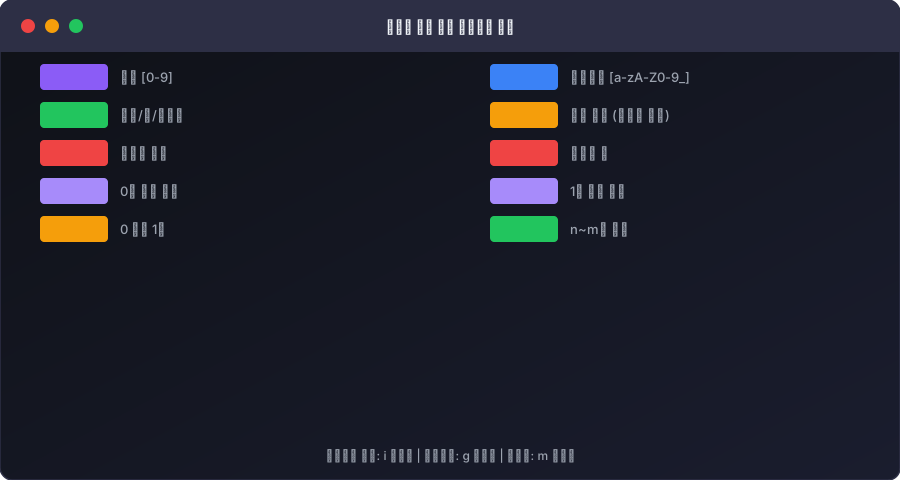
Think of regex as a specialized language for text manipulation. Just like you use SQL to query databases, you use regex to query and transform strings. In modern development, regex testing and validation tools are essential because writing correct patterns on the first try is nearly impossible—even for experienced developers.
Why Regex Matters in Development
In real-world applications, regex solves critical problems:
Data Validation: Ensure user input meets specific formats (emails, phone numbers, URLs, credit cards) Data Extraction: Parse logs, HTML, JSON, or unstructured text to extract meaningful information Text Replacement: Find and replace complex patterns across large documents Search Functionality: Implement powerful search features in applications Security: Validate and sanitize user input to prevent injection attacks
Without proper regex testing, validation bugs can slip into production, leading to rejected form submissions, security vulnerabilities, or incorrect data processing.
Regex Syntax Basics: Building Blocks
Before diving into complex patterns, let's master the fundamental components of regular expressions.
Character Classes
Character classes define sets of characters to match:
.- Matches any single character except newline[abc]- Matches any single character in the set (a, b, or c)[^abc]- Matches any character NOT in the set[a-z]- Matches any character in the range\d- Matches any digit (0-9), equivalent to [0-9]\D- Matches any non-digit\w- Matches word characters (a-z, A-Z, 0-9, _)\W- Matches non-word characters\s- Matches whitespace (space, tab, newline)\S- Matches non-whitespace
Quantifiers
Quantifiers specify how many times an element should match:
*- Zero or more times+- One or more times?- Zero or one time (optional){n}- Exactly n times{n,}- n or more times{n,m}- Between n and m times
Groups and Alternation
(abc)- Capturing group: groups characters and captures them for later reference(?:abc)- Non-capturing group: groups without capturinga|b- Alternation: matches either a or b\1, \2- Backreferences: refers to the nth captured group
Anchors
Anchors specify positions in the text:
^- Matches the start of a string$- Matches the end of a string\b- Matches a word boundary\B- Matches a non-word boundary
Common Regex Patterns: Real-World Examples
These patterns are frequently used in production applications:
Email Validation
^[a-zA-Z0-9._%+-]+@[a-zA-Z0-9.-]+\.[a-zA-Z]{2,}$
This pattern validates basic email addresses by checking for:
- Alphanumeric characters, dots, underscores, percent signs, plus signs, and hyphens before the @ symbol
- Domain name with alphanumeric characters and hyphens
- Top-level domain with at least 2 letters
Phone Number Validation
^(\+?1[-\.\s]?)?\(?[0-9]{3}\)?[-\.\s]?[0-9]{3}[-\.\s]?[0-9]{4}$
This pattern matches various US phone number formats:
- Optional country code (+1)
- Optional area code in parentheses
- Flexible separators (dash, dot, space)
- 10-digit number structured as 3-3-4
URL Validation
^https?:\/\/(www\.)?[-a-zA-Z0-9@:%._\+~#=]{1,256}\.[a-zA-Z0-9()]{1,6}\b([-a-zA-Z0-9()@:%_\+.~#?&//=]*)$
This comprehensive pattern validates HTTP(S) URLs with:
- Protocol (http or https)
- Optional www subdomain
- Domain name and top-level domain
- Optional path, query parameters, and fragments
IP Address Validation
^((25[0-5]|(2[0-4]|1\d)?[0-9])\.?\b){4}$
This pattern validates IPv4 addresses by ensuring:
- Four groups of numbers
- Each group between 0-255
- Groups separated by dots
Regex Flags: Modifying Behavior
Flags change how regex patterns are interpreted:
g(global) - Find all matches, not just the firsti(ignore case) - Perform case-insensitive matchingm(multiline) - Treat ^ and $ as line boundaries, not string boundariess(dotall) - Make . match newline charactersu(unicode) - Enable Unicode mode for better international character supporty(sticky) - Match starting at the current position in the string
For example, const emails = text.match(/[a-z]+@[a-z]+\.[a-z]{2,}/gi) uses both g and i flags to find all email addresses regardless of case.
Common Pitfalls: What Developers Get Wrong
Understanding common mistakes helps you write better regex patterns and debug faster.
Greedy vs Lazy Matching
Quantifiers are greedy by default—they match as much as possible:
<.*> // Greedy: matches from first < to LAST >
For the text <div>content</div>, greedy matching returns the entire string. Use lazy quantifiers (adding ?) to match as little as possible:
<.*?> // Lazy: matches from < to first >
Now the same text returns only <div>.
Catastrophic Backtracking
Some patterns cause exponential time complexity when matching fails:
(a+)+b // Dangerous pattern
When this pattern fails to match a string of 'a's with no 'b' at the end, the regex engine backtracks excessively. This can freeze your application for strings with just 20-30 characters.
Not Escaping Special Characters
Special regex characters must be escaped if you want to match them literally:
// Wrong: looks for a or b or end of string
a|b|$

// Correct: looks for a or b or the literal character $
a|b|\$
Assuming Regex Validates Complex Formats
Regex is excellent for format validation but shouldn't be your only validation layer. For complex validation (like actually checking if an email address exists), combine regex with additional logic.
Performance Optimization: Making Regex Fast
Performance matters, especially when processing large datasets or user input in high-traffic applications.
Optimize Pattern Complexity
Complex patterns take longer to evaluate. Simplify when possible:
// Complex and slow
(a|b|c|d|e|f|g|h|i|j)

// Simpler and faster
[a-j]
Use Anchors to Limit Scope
Anchors help the regex engine avoid unnecessary scanning:
// Slow: engine searches entire string
\d{3}-\d{4}

// Faster: anchored to start
^\d{3}-\d{4}
Pre-compile Regex Patterns
In loops or frequently-called functions, compile regex patterns once outside the loop:
// Inefficient
function validate(input) {
  for(let item of items) {
    if(/^\d+$/.test(item)) { }  // Regex recompiled each iteration
  }
}

// Efficient
const numberRegex = /^\d+$/;
function validate(input) {
  for(let item of items) {
    if(numberRegex.test(item)) { }  // Regex compiled once
  }
}
Avoid Unnecessary Alternation
Test specific patterns before using alternation:
// Slow: many alternatives checked
(option1|option2|option3|option4|option5)

// Faster: use character class
[12345]
Real-World Use Cases: Practical Applications
Understanding how regex applies to real problems helps you become proficient.
Form Validation
Websites validate user input on both client and server side:
const emailRegex = /^[a-zA-Z0-9._%+-]+@[a-zA-Z0-9.-]+\.[a-zA-Z]{2,}$/;
const passwordRegex = /^(?=.*[a-z])(?=.*[A-Z])(?=.*\d)(?=.*[@$!%*?&])[A-Za-z\d@$!%*?&]{8,}$/;

if(!emailRegex.test(userEmail)) {
  showError("Invalid email");
}
Log File Parsing
Extract relevant information from application logs:
const logRegex = /\[(.*?)\] (\w+): (.*)/;
const match = logLine.match(logRegex);
// match[1] = timestamp
// match[2] = level (ERROR, INFO, etc)
// match[3] = message
Data Extraction
Parse HTML or text to extract structured data:
const htmlRegex = /<h2>(.*?)<\/h2>/g;
const titles = html.match(htmlRegex).map(match =>
  match.replace(/<\/?h2>/g, '')
);
Search Implementation
Create powerful search features that understand user intent:
// Find words starting with 'api' (case-insensitive)
const searchRegex = /\bapi\w*/gi;
const matches = documentation.match(searchRegex);
Testing and Debugging Regex Patterns
Writing regex is an iterative process. The best approach involves:
- Start Simple - Begin with basic patterns and gradually add complexity
- Test Incrementally - Verify each component works before combining
- Use Visual Tools - Regex testers help visualize pattern matching
- Test Edge Cases - Try boundary conditions, empty strings, special characters
- Measure Performance - Test patterns against representative data
This is where regex testing tools become invaluable. Instead of writing test code and running it, visual regex testers let you instantly see what matches and what doesn't.
Introducing UtiliZest's Regex Tester
Writing and debugging regex patterns shouldn't require constant code compilation and testing. UtiliZest's Regex Tester provides a browser-based environment where you can:
- Write patterns and instantly see matches highlighted in real-time
- Test against multiple strings simultaneously
- Visualize captured groups and their values
- Experiment with different flags without code changes
- Save frequently-used patterns for later reference
- Export test results for documentation
No installation needed—access the tool directly at utilizest.work and start testing regex patterns immediately. The visual feedback makes pattern development faster and debugging easier.
Best Practices Summary
- Validate Input: Always validate user input with regex before processing
- Keep Patterns Simple: Complex patterns are hard to maintain and debug
- Test Thoroughly: Use regex testing tools to verify patterns against various inputs
- Document Patterns: Add comments explaining complex regex patterns
- Optimize for Performance: Profile patterns that process large datasets
- Use Raw Strings: In JavaScript, use
/pattern/syntax rather than string literals - Consider Alternatives: For very complex parsing, consider parsers instead of regex
- Security First: Sanitize user input before using regex to prevent injection attacks
Conclusion
Regular expressions are indispensable for modern development. While they have a steep learning curve, mastering regex patterns significantly improves your ability to validate, search, and transform text efficiently. By understanding the fundamentals, practicing with real-world examples, and using proper testing tools, you'll write better patterns faster and debug issues more effectively.
The key to regex mastery is practice. Start with simple patterns, gradually increase complexity, and always test thoroughly. With UtiliZest's Regex Tester at your fingertips, you have a powerful tool to accelerate your learning and development process.
Regex Cheat Sheet: Essential Patterns
A single-reference collection of regex patterns that cover 90% of real-world use cases.
Core Syntax Quick Reference
| Pattern | Meaning | Example Match |
|---|---|---|
. | Any char except newline | a, 1, ! |
d | Digit [0-9] | 3, 9 |
w | Word char [a-zA-Z0-9_] | a, Z, _ |
s | Whitespace | , , ` |
| ` | ||
^ | Start of string | ^Hello → "Hello world" |
$ | End of string | world$ → "Hello world" |
* | 0 or more | ab* → "a", "ab", "abbb" |
+ | 1 or more | ab+ → "ab", "abbb" |
? | 0 or 1 | colou?r → "color", "colour" |
{n,m} | n to m times | d{3,5} → "123", "12345" |
Production-Ready Pattern Library
Email validation:
^[a-zA-Z0-9._%+-]+@[a-zA-Z0-9.-]+.[a-zA-Z]{2,}$

US Phone number:
^+?1?s?(?d{3})?[s.-]d{3}[s.-]d{4}$

URL (http/https):
https?://[^s/$.?#].[^s]*

IPv4 address:
^((25[0-5]|2[0-4]d|[01]?dd?).){3}(25[0-5]|2[0-4]d|[01]?dd?)$

Hex color code:
^#([A-Fa-f0-9]{6}|[A-Fa-f0-9]{3})$

Date (YYYY-MM-DD):
^d{4}-(0[1-9]|1[0-2])-(0[1-9]|[12]d|3[01])$
Top 3 Regex Mistakes
-
Greedy vs Lazy matching confusion:
<.*>captures<b>bold</b>in full, but<.*?>captures only<b>. Add?when you want minimal matching. -
Forgetting to escape special characters:
.,*,+,?,(,),[,],{,},^,$,|,must be escaped withwhen used literally. To matchexample.com, writeexample.com. -
Missing flags: Don't forget the
iflag for case-insensitive matching,mfor multiline^$, andgfor global search.